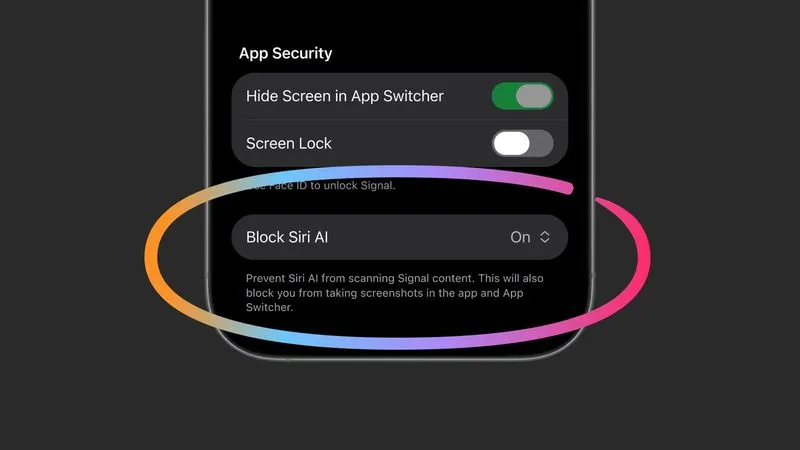
Signal now blocks Siri AI and Gemini: what to change
- News
 Andrea Roques
- Apps
- Published
Signal now stops the AI assistants built into your phone from reading your chats. On iPhone with iOS 27, a new Block Siri AI setting is on by default and blocks screenshots inside the app. On Android, Signal switches on Screen security by itself the first time an assistant such as Gemini tries to read the screen. Signal president Meredith Whittaker announced the change on November 20, 2026.
Your messages stay end-to-end encrypted either way. What changes is what happens once they are decrypted and displayed: that is the moment an operating-system agent can scan them.
This is a sourced analysis of Signal's announcement and support page, not a hands-on test, so there is no rating.
Key takeaways
- Versions: Signal 8.37 or later on iOS 27 or later, Signal 8.35.1 or later on Android.
- iPhone: Block Siri AI is on by default, with three choices (On, Off, Off for 10 minutes). It blocks screenshots, screen recordings and the App Switcher preview.
- Android: Screen security turns on automatically when Signal detects an assistant reading the screen. You can switch it on yourself right away.
- Mac: Signal cannot block screenshots on macOS. Its advice is to add Signal to the Excluded Apps list in System Settings > Siri.
- Signal calls its own fix "incomplete": it does nothing against an agent reading notifications or files already on the device.
A screenshot block, aimed at AI rather than at you
The target is a new kind of feature. Siri AI on iOS 27 has onscreen awareness: you call Siri and ask about whatever is displayed, and Apple's own guide explains that Siri taps into Visual Intelligence to do it. Google's Gemini Intelligence on Android works on the same principle. In Signal's blog post, Whittaker writes that these agents "scan" the screen, and that captured Signal data can end up in "whatever local database or remote server" the agent uses at that moment.
That is outside Signal's control. Encryption protects a message in transit. It cannot protect pixels on a screen.
Signal has done this once already. In May 2025 it turned on screen security by default in Signal Desktop for Windows 11, so that Microsoft Recall could not store screenshots of chats. The November 2026 version extends the same logic to phones, with one big difference: Signal had to reverse-engineer how each assistant reads the screen, because, in Whittaker's words, Apple, Google and Microsoft provide no simple, documented opt-out for developers.
What Signal blocks on each platform
The behaviour is not the same everywhere. The table below summarises Signal's support page and the footnotes of the blog post.
| Platform | Minimum version | On by default? | What it blocks | Where to change it |
|---|---|---|---|---|
| iPhone (iOS 27+) | Signal 8.37 | Yes | Screenshots, screen recordings, App Switcher preview, Siri AI scanning | Settings > Privacy > Block Siri AI |
| Android | Signal 8.35.1 | Automatic on first detected AI access | Screenshots, screen recordings, recent apps preview, on-screen reading | Settings > Privacy > App security > Screen security |
| macOS 27 | None | No protection possible | Nothing | System Settings > Siri > Excluded Apps (Apple setting) |
| Windows 11 | Signal Desktop (since May 2025) | Yes | Screenshots, including Microsoft Recall | Signal Settings > Privacy > Screen security |
iPhone: three positions instead of an on/off switch
On iOS, try a screenshot inside Signal and the app shows a message saying it was prevented. Tap Options and you get the three choices: keep the block, turn it off, or turn it off for 10 minutes. That last one is the practical setting. Need to capture a delivery address or an event invite? The protection returns by itself.
Turn it off permanently and Signal asks for confirmation once, then never reminds you. The App Switcher preview has its own separate toggle, Hide Screen in App Switcher.
Android: detection instead of a blanket block
Why not just block screenshots on Android too? Signal explains it in a footnote. Android comes in many vendor flavours, and on many of them Signal cannot reliably detect a screenshot attempt once screenshots are disabled. Blocking silently would leave users confused. So Signal watches for an assistant trying to read the screen, then turns Screen security on and shows a message explaining why.
One detail matters here. If you dismiss the protection from that prompt with "Turn off screen security", Signal re-enables it after 90 days. If you turn it off manually in the settings, it stays off. On Android, when Screen security is on, your phone simply refuses the screenshot.
What the block does not stop
Whittaker is blunt about it: the remedy is "incomplete". Restricting screenshots does nothing against an agent pulling content already stored on the device through the file system. Two other doors stay open, and recent reporting shows they are not theoretical.
Notifications. On November 18, Reuters reported (article republished by Investing.com) that, in tests run with Signal staff and the AI Now Institute, Meta's Muse agent read Signal messages on an Android phone through the push-notification permission granted at setup. Signal's screen block does not cover that path. Neither does it cover Gemini: the EFF notes that Gemini can read notifications when the "Device Assistance" connected app is enabled, which it usually is because it also powers basic features like timers.
Accessibility permissions. On a Mac, the same Reuters tests showed Muse combining accessibility and screenshot tools. The same requests were blocked on an iPhone. Apple has since restricted developers' use of accessibility tools on Macs and added agent-specific permissions, according to Reuters. Signal's post calls the abuse of accessibility settings a "skeleton key".
The fix for those two doors sits in your phone settings, not in Signal.
Close the other doors in five minutes
If you want Signal's protection to mean something, pair it with these system settings. Menu names can vary slightly between versions.
- iPhone (iOS 27.2 or later): Settings > Siri > Excluded Apps > Add Apps, then pick Signal. Siri AI can no longer read the app, and onscreen awareness stops working inside it, as the EFF confirmed when the setting arrived.
- Mac (macOS 27): System Settings > Siri > Excluded Apps. This is the only protection Signal recommends on the Mac.
- Android with Gemini: in the Gemini app, tap your photo, then Settings. Check Personal Intelligence > Connected Apps (revoke Device Assistance if you do not need it) and the screen context option ("Use screen and app data").
- Any AI agent app: review which apps hold notification access (Android) or accessibility access (Mac). That is exactly the route Muse used.
In Europe, the iPhone part barely applies for now
Here is the nuance most coverage skipped. Apple says Siri AI will not initially be available in the EU on iOS, iPadOS and watchOS, and repeated on November 13, when it launched HomeView, that Siri AI is "currently unavailable in iOS in the EU". An iPhone in France, Spain or Italy therefore has no Siri AI to block today. Signal's support page does not say whether the screenshot block behaves differently in the EU.
The Mac is different. Apple's footnote excludes the EU for iOS, iPadOS and watchOS, but does not list macOS. A European Mac user with Siri AI turned on should add Signal to Excluded Apps.
For US readers on iOS 27 with Siri AI, the default protection is active from Signal 8.37. Android users anywhere are covered by the automatic detection, with one caveat: Signal admits it cannot cover every Android build.
Who should keep it on, who can relax it
- Keep it on: journalists, lawyers, activists, anyone sharing health or financial details, and anyone in group chats. A screenshot exposes your contacts' messages, not only yours.
- Use "Off for 10 minutes": people who occasionally screenshot an address, a ticket or a recipe a friend sent.
- Turn on Screen security manually on Android: if your phone comes from a brand where detection may fail. You lose screenshots, you gain certainty.
- Turning it off permanently only makes sense if you never use Siri AI, Gemini or a third-party agent. Even then, the gain is small.
Our take: the case for assistants you host yourself
Signal is treating its own operating systems as a threat model. That should get the attention of anyone building a smart home around a cloud voice assistant.
The same question applies at home. A voice assistant that answers about your devices also sees your routines, your presence and sometimes your cameras. Whittaker's point is that once an OS agent captures data, where it goes is up to the agent's maker. That is why we keep pushing local voice with Home Assistant: the speech-to-text, intent handling and device state stay on hardware you own. Our local voice hardware guide for Home Assistant covers what that takes in 2026, and our robot vacuum privacy guide applies the same logic to cameras on wheels.
Signal's demand is reasonable and specific. Developers want a documented way to mark an app as off-limits to AI agents, covering screen reading, files, notifications and APIs. They also want real documentation of how these agents access data. Signal says it is "cautiously optimistic" after talks with Apple and Google, and both companies told Reuters they were considering changes.
FAQ
Why can't I take screenshots in Signal anymore?
On iOS 27 with Signal 8.37 or later, Block Siri AI is on by default and blocks screenshots in the app. Tap Options on the message that appears to turn it off for 10 minutes or permanently. On Android, Screen security switched on because Signal detected an assistant reading the screen.
Does this change Signal's encryption?
No. Signal says the setting only affects screen capture and on-device scanning. Encryption, who can see your messages and every other setting stay the same.
Is my iPhone in France concerned?
Siri AI is not initially available in the EU on iOS, so there is no Siri AI on a European iPhone to block for now. On a Mac with Siri AI, add Signal to Excluded Apps in System Settings > Siri.
Does the block protect against Meta's Muse or other agents?
Only partly. It stops screen reading inside Signal, but Reuters showed Muse reading Signal messages through Android notification access. Check which apps hold notification and accessibility permissions.
Do I need to update Signal?
Yes: version 8.37 or later on iPhone (with iOS 27) and 8.35.1 or later on Android, according to Signal's support page.
Verdict
Leave the protection on. On iPhone, use "Off for 10 minutes" when you need a screenshot. On Android, switch Screen security on yourself rather than waiting for detection. On a Mac, exclude Signal from Siri. Then spend five minutes on notification and accessibility permissions, because that is where the next leak will come from, not from Signal's code. Our iOS 27 and Siri AI guide explains the rest of Apple's settings, and Signal 8.30's local backups cover the other half of keeping your chats under your control.
Sources
- Signal blog, "Signal is Serious About Protecting Your Privacy", Meredith Whittaker, November 20, 2026
- Signal Support, "Screen security: blocking Google Gemini and Siri AI"
- Signal blog, "By Default, Signal Doesn't Recall", May 2025
- Apple Support, Siri AI and what's on your iPhone screen (availability and EU footnote)
- EFF, "Victory! You Can Now Exclude Apps from Siri AI", October 28, 2026
- Reuters (via Investing.com), Meta's Muse agent and Signal messages, November 18, 2026
- The Verge, November 20, 2026 and BleepingComputer, November 22, 2026
By Andrea R., based on Signal's announcement and support documentation, Apple's support pages and the reporting above. See also how we test and our Home Assistant guide.
Disclosure: Rocks on Galaxy has no commercial relationship with Signal, Apple, Google or Meta for this article. This is a sourced news analysis, not a hands-on review, with no rating and no affiliate links. Hero image: official Signal illustration of the iOS "Block Siri AI" setting from its November 20, 2026 blog post, resized and padded to 16:9, otherwise unedited. Facts checked on November 24, 2026.
Tags :
- Signal
- Siri AI
- Gemini
- IOS 27
- Android
- Privacy
- AI agents
Share :