ThirdReality Zigbee Review with Home Assistant: 4 Products
- Test
- Andrea R.
- Maison connectee
- 01 Nov, 2026
- 0
Products provided by ThirdReality for this test; the brand did not review the article.
By Andrea R. Galati
Why I chose ThirdReality to expand my Home Assistant home
Verdict: all four ThirdReality products, including the bonus air quality sensor, were integrated into Home Assistant in a single afternoon, with no cloud and no proprietary app. I finally have room-by-room data, where before I had just one reading.
My home runs on Home Assistant, installed in Docker on a Raspberry Pi 5. Until now, my only indoor temperature came from the Nest thermostat in the living room, and the garage was a blind spot. I wanted more sensors, running locally, that I could control remotely when I'm away.
ThirdReality sells affordable Zigbee devices that work with Home Assistant, plus a USB-C dongle to control them. I tested four of the brand's products: the Zigbee 3.0 dongle, the R3 presence sensor, the temperature/humidity sensor and, as a bonus, the Smart Air Quality Sensor 3RAQ1096Z.
The hardware I tested
All four devices speak Zigbee 3.0 and are natively recognized by Home Assistant (ZHA integration).
| ThirdReality product | Model | What it measures or does | List price |
|---|---|---|---|
| Zigbee 3.0 USB-C Dongle | 3RZD02032Z | Zigbee coordinator: the bridge between Home Assistant and the sensors | $19.99 |
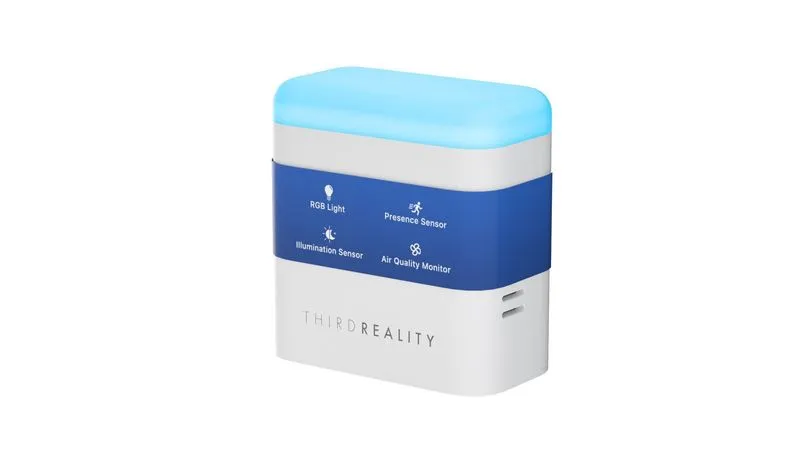
| Smart Presence Sensor R3 | 3RPL01084Z | 60 GHz radar presence, illuminance (lx), air quality (TVOC, ppb), night light; mains-powered, also acts as a Zigbee repeater | $49.99 |
| Temperature and humidity sensor | 3RTHS24BZ | Temperature, humidity, battery level | $24.99 |
| Smart Air Quality Sensor (bonus) | 3RAQ1096Z | CO₂, temperature, humidity | $49.99 |
List prices checked on thirdreality.com on October 28, 2026.
The ThirdReality Zigbee dongle: setup in Home Assistant
The dongle works very well, as long as you manually pick the right radio type: ZiGate. Home Assistant's auto-detection, on the other hand, fails.
The steps that work
- Plug the dongle into a USB 2 (black) port on the Raspberry Pi, ideally at the end of a 20 to 50 cm extension cable. USB 3 ports interfere with the 2.4 GHz band.
- If Home Assistant runs in Docker, restart the container: a USB device plugged in after it starts stays invisible. The dongle shows up as
/dev/ttyUSB0(CH340 serial chip). - Add the ZHA integration, pick the port, then the ZiGate radio type, 115200 baud, no flow control.
- Let ZHA create a new network. Allow about 2 minutes: the ZiGate doesn't do an energy scan and starts slowly.
- Change the channel before pairing anything. My network came up on channel 15, right next to my 2.4 GHz Wi-Fi (channel 1). I moved it to channel 25, well away from any interference.
The catch you need to know
Home Assistant automatically probes Silicon Labs (EZSP) and Texas Instruments (ZNP) chips. The ThirdReality dongle ships with ZiGate firmware (3.21 on my unit): none of the automatic probes recognize it. The answer is in the manual, which specifies adapter: zigate for Zigbee2MQTT.
Benefits
- Low price: under $20 for a Zigbee 3.0 coordinator.
- 100% local: no account, no cloud; everything goes through Home Assistant.
- USB-C form factor + USB-A adapter included: it plugs in anywhere.
- Firmware updates possible over USB (and for devices, OTA via ZHA).
The ThirdReality R3 presence sensor in the garage
The R3 is the most interesting product of the bunch: a single box reports four kinds of data to Home Assistant. It paired within seconds, as soon as it was powered on.
| Feature | Entity in Home Assistant | Value measured during the test |
|---|---|---|
| Presence (60 GHz radar) | “occupancy” binary sensor | detected / clear |
| Air quality | TVOC in ppb | 41 to 88 ppb |
| Illuminance | lux | 1 to 139 lx |
| Night light | controllable light | on / off, brightness |
Air quality data that helps when I'm working on projects
The garage is where I do my DIY work. Paint, glue, solvents or a running engine push up volatile organic compounds (TVOC). The R3 shows them to me live, and its alert threshold is adjustable (6,000 ppb by default). So I know when to air out the space during a project, instead of guessing.
Presence: settings and a limitation
I set the delay before “clear” to 30 seconds, to avoid flickering when someone stays still. Sensitivity ranges from 1 to 6 (3 by default).
Limitation I noticed: the radar can't tell a human from an object. When the garage door closes, it switches to “presence” within the same second. So for the door's state, I'm keeping my magnetic contact sensor.
An alert when the house is empty
With two Home Assistant automations, I get a notification on my phone:
- presence in the garage while nobody is home, unless the door has just moved (less than 90 s ago);
- garage door open while nobody is home.
Each alert waits one minute and checks again before firing. That way, pulling in by car before my phone is detected as home doesn't trigger anything.
Benefits
- 4 sensors in 1: presence, illuminance, air quality and night light.
- Security: an alert when someone is in the garage while you're away.
- Health: an eye on the air during projects.
- Stronger network: being mains-powered, it relays the Zigbee signal for battery-powered sensors.
- Future-proof: its firmware update was done from Home Assistant, no app needed.
The ThirdReality temperature and humidity sensor in the bedroom
This small battery-powered sensor provides the second indoor reading my heating and air conditioning were missing. It was the first to pair, with an excellent signal and the battery at 100%.
More sensors, better heating and AC control
My Nest thermostat only measures the living room. But the primary bedroom is at the far end of the house, against the garage. At the time of the test:
| Room | Sensor | Temperature | Humidity |
|---|---|---|---|
| Living room | Nest | 69.6 °F (20.9 °C) | 57% |
| Primary bedroom | ThirdReality 3RTHS24BZ | 68.2 °F (20.1 °C) | 59% |
Nearly one degree Fahrenheit of difference, even though the Nest assumes the whole house is at the same temperature. With a reading per room, Home Assistant can adjust the setpoint based on the room where you sleep, not just the living room.
Benefits
- Comfort: you set heating and AC based on the bedroom's actual temperature.
- Savings: you avoid overheating or overcooling one room to reach the target in another.
- Humidity under control: useful for running a humidifier or spotting overly dry air in winter.
- History: Home Assistant draws 24-hour graphs to compare rooms.
- Self-contained: wireless, battery-powered, unobtrusive on a nightstand.
Bonus: the ThirdReality air quality sensor in the living room
The Smart Air Quality Sensor (model 3RAQ1096Z) adds the reading the living room was missing: CO₂. It paired in under a minute, with its firmware already up to date.
| Measurement | Value measured during the test |
|---|---|
| CO₂ | 382 to 390 ppm |
| Temperature | 72.2 °F (22.3 °C) |
| Humidity | 59% |
I placed it to the right of the fireplace. In the 3D house, its label turns from green to orange above 800 ppm, then red above 1,200 ppm. Above 1,000 ppm, it's time to air out the room.
Benefits
- Healthy air: a hard number that tells you when to open the windows, especially when the house is shut tight in winter or running the AC in summer.
- Three measurements in one box: CO₂, temperature and humidity.
- 24-hour graph in Home Assistant, next to the Nest's.
Dashboards and a 3D house: the sensors in a digital twin
ThirdReality data shows up everywhere in Home Assistant, including in an interactive 3D model of my home.
On the wall display and on mobile
- Home: a “Garage” badge shows presence at a glance.
- Climate: the living room (Nest) and the bedroom (ThirdReality) side by side, with the graph of the last 24 hours for temperature (°F and °C) and humidity.
- Garage: presence, air quality, illuminance and the night light switch.
In the 3D house
My home exists in 3D in Home Assistant, as a “dollhouse” where you can see inside room by room. The new sensors were placed at their real positions:
- the R3 on the garage wall: a green zone lights up on the floor when it detects someone, and its ring glows with the night light;
- the temperature sensor on the nightstand: a label permanently shows “°F · °C · %”;
- the Nest on the living room wall, next to the hallway: its screen turns orange when heating and blue when cooling.
Tapping a sensor opens its live values. It's the most telling way to see what's happening in the house, especially remotely.
Home Assistant compatibility
Yes, all four ThirdReality products work with Home Assistant, with no cloud and no brand app.
| What I checked | Test result |
|---|---|
| ZHA integration (native) | Works; the ZiGate radio type must be selected manually |
| Zigbee2MQTT | Supported by the manufacturer (adapter: zigate), not tested here |
| Sensor recognition | Automatic: ZHA loads a dedicated profile for the R3 radar |
| Firmware update (OTA) | Done from Home Assistant on the R3, version 0x23 to 0x28 |
| Remote operation | Through Home Assistant, like any local device |
| ThirdReality account or cloud | None required |
The only effort required is selecting the ZiGate radio manually. After that, each sensor shows up with all its entities, settings and updates.
My verdict on the four ThirdReality products
I recommend these four products for expanding a Home Assistant setup on a budget, especially the R3 presence sensor.
| Product | Pros | Cons |
|---|---|---|
| Zigbee USB-C dongle | Price, 100% local, updates possible | ZiGate firmware not auto-detected; slow network startup; no channel scan |
| R3 presence sensor | 4 functions in 1, Zigbee repeater, OTA from Home Assistant | Can't tell a human from a moving door |
| Temperature/humidity sensor | Instant pairing, excellent signal, unobtrusive | Nothing to report during the test |
| Air quality sensor 3RAQ1096Z (bonus) | CO₂, temperature and humidity in one box, pairing in under a minute, firmware already up to date, 24-hour graph | Nothing to report during the test |
Who is it for? Home Assistant users who want room-by-room readings, garage or workshop monitoring, and a system that stays local. Those who want to automate everything without any configuration will prefer a dongle that's detected automatically.
FAQ
Is the ThirdReality dongle compatible with Home Assistant?
Yes, with the ZHA integration. Manually select the “ZiGate” radio type, at 115200 baud, because auto-detection fails.
Does it work with Zigbee2MQTT?
The ThirdReality manual specifies adapter: zigate for Zigbee2MQTT. I only tested it with ZHA.
Does the R3 sensor only detect humans?
No. Its 60 GHz radar detects any movement, including a garage door. Filter out these cases in your automations, for example by ignoring detections that follow a door movement.
What does the R3's air quality sensor measure?
Volatile organic compounds (TVOC), in ppb. They rise with paint, glue, solvents or exhaust fumes.
Do you need a ThirdReality app or account?
No. Everything is done in Home Assistant, locally, including firmware updates.
Which Zigbee channel should you choose?
A channel far from your 2.4 GHz Wi-Fi. With Wi-Fi on channel 1, Zigbee channel 25 is a good choice. Change it before pairing your devices.
Read also: Zigbee vs Matter/Thread for Home Assistant