Old Google Home Mini or Echo Dot? Turn It Into a Home Assistant Voice Speaker
- News
- Rocks on Galaxy
- Maison connectee
- 24 Oct, 2026
- 0
If you have a Google Home Mini or an old Echo Dot in a drawer, it does not have to end up as e-waste. On October 22, 2026, Open Home Foundation president Paulus Schoutsen published "How to take back your voice", a roundup of community projects that turn retired Google and Amazon speakers into local voice satellites for Home Assistant. Some swap the circuit board, others replace the firmware. The right option depends on one thing: which speaker you actually own. This guide starts with that question and gives you the option, the risk and the cost for each device.
Start here: which speaker do you have?
Find your model in the left column. The status column reflects each project's own page as of October 24, 2026.
| Your device | Best option today | Method | Original assistant | Risk | Status |
|---|---|---|---|---|---|
| Google Home Mini (1st gen, micro-USB) | MiciMike drop-in PCB | Swap the board, no soldering | Removed | Low | Pre-order, $99, ships Jan 8, 2027 |
| Google Nest Mini (2nd gen, round power jack) | MiciMike Nest Mini board, Onju Voice | Board swap | Removed | Low to medium | MiciMike version still a prototype |
| Amazon Echo Dot (2nd gen, 2016) | EchoMuse, Kiosk Satellite, overdub, TECHO5 | Firmware unlock | Removed (overdub keeps Alexa) | Medium | Available, open source |
| Amazon Echo Dot (3rd gen) | LocalDot, TECHO5 | Board swap or firmware | Removed | Medium | LocalDot "coming soon"; TECHO5 works on one unit |
| Echo Show 5 / Show 8 (2019 and 2021), Echo Spot (2017) | TECHO5 | Firmware unlock, Alpine Linux | Removed | Medium to high | In daily use by the developer |
| Any Echo made after 2021 | No public option | None | Stays | n/a | No public unlock |
Key takeaways
- Older speakers can become local Home Assistant voice satellites, with no cloud account or Alexa subscription.
- Google Home Mini (1st gen): the MiciMike board is the easiest route. You swap the board, no soldering, and it arrives pre-flashed with ESPHome. It costs $99 and ships January 8, 2027.
- Echo Dot 2nd gen: four open-source firmware projects are available today. They involve a one-time USB unlock that has a small brick risk.
- Echo devices made after 2021 have no public unlock. For those, a $69 Home Assistant Voice Preview Edition is still the simpler choice.
- In every case you lose Alexa or Google Assistant features: shopping, calls, skills. You get local control and a speaker that keeps working.
Why this is happening now
Two moves from the big platforms pushed this into the mainstream. In June 2026, 9to5Google reported that Google had ended production of the Nest Mini and Nest Audio. The new Google Home speaker replaces them, and existing units keep getting updates for now. On the Amazon side, Wired explained in January 2026 that Alexa+ was being switched on for Prime members, even some who had declined it. Saying "Alexa, exit Alexa Plus" goes back to the original assistant, and Alexa+ is set to cost $20 a month without Prime.
The Open Home Foundation's newsletter frames this as a question of ownership. The hardware still works. What changes is the software deciding what it does.
The risk ladder: from no screwdriver to a new firmware
The projects do not ask the same commitment. Here they are ranked from the least to the most invasive:
- Keep Alexa, add Home Assistant on the side (overdub). This is for a rooted Echo Dot 2nd gen. Alexa keeps running, and the action button plus a Music Assistant player become Home Assistant entities.
- Swap the board (MiciMike, LocalDot). You open the case and replace the electronics with an open board. The original firmware is never touched. Nothing is soldered or cut, so you can keep the original board in a drawer.
- Replace the firmware (EchoMuse, Kiosk Satellite, TECHO5). A one-time USB unlock using the public amonet exploit chain opens the device. Then a new system runs on it. This is where a mistake can soft-brick a unit.
Google speakers: a board swap
Google Home Mini (1st gen): MiciMike
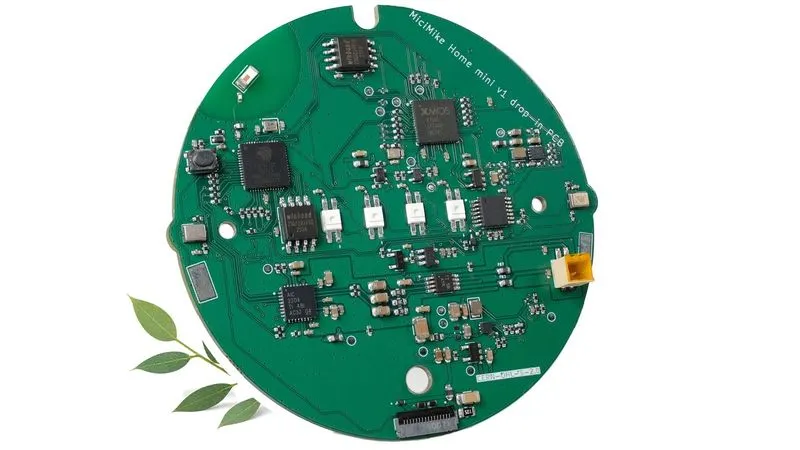
The MiciMike Home Mini Drop-In PCB is the most polished project of the lot. It is a 72 × 70 mm board designed by Imre Laszlo (MiciMike ReV Devices, Ireland) and manufactured by Elecrow. You remove the original board, connect the included FPC cable, and close the case. The original speaker and hardware mute switch are reused.
- Hardware: ESP32-S3 (240 MHz, 8 MB PSRAM, 16 MB flash, Wi-Fi and Bluetooth LE 5.0), an XMOS XU316 audio processor for echo cancellation and noise suppression, two MEMS microphones in the original positions.
- Software: pre-flashed ESPHome, Assist, on-device wake word, Music Assistant, Snapcast and Sendspin support.
- License: open hardware under CERN-OHL-S v2. Files are on GitHub.
- Funding: $132,614 raised from 654 backers against an $8,000 goal.
Two caveats. First, shipping. Orders are scheduled to ship January 8, 2027, and an October 9 update reported a delay to the first batch for accounting and compliance reasons. Second, regions. CE, UKCA and RCM certification is still in progress, and the campaign says boards cannot ship to Europe, the UK or Australia until it is done. US shipping is $8 and worldwide shipping $18.
The creator explains that his work started after Onju Voice, an earlier board for the Nest Mini. Onju shares one audio line between the mic and speaker, so it cannot listen and play at the same time. MiciMike was designed to fix that.
Google Nest Mini (2nd gen)
The Nest Mini uses a different board and a round power connector. MiciMike's Nest Mini version is still at the prototype review stage. Onju Voice exists for this model, but with the half-duplex limitation described above. If you have a Nest Mini, wait or buy a dedicated speaker.
Amazon Echo: board or firmware
Echo Dot 2nd gen: four firmware choices
This 2016 puck is the best-served device, because its bootloader is publicly unlockable.
- EchoMuse replaces Android with emOS while keeping the kernel. A browser wizard handles the unlock. A controller runs as a Home Assistant add-on or a Docker container, and the Dot shows up as an ESPHome voice satellite and media player. The original boot image is saved and can be restored. Ports to the Dot 3rd gen, Echo 2nd gen and Show 8 are in progress.
- Kiosk Satellite flashes a LineageOS 14.1 image and runs headless. It adds an intercom, alarms, timers and DLNA audio. Since image 2026.10.3, it can run Amazon's own wake-word engine locally.
- overdub is the "both" option. On a rooted Dot running FireOS 5.5.5.4 with Magisk, it keeps Alexa and exposes the button and a Sendspin player to Home Assistant. Its optional Alexa command feature carries a risk to your Amazon account, according to the author.
- TECHO5 also supports the Dot 2nd gen.
Echo Dot 3rd gen: LocalDot is on the way
LocalDot, by Alessandro Alfonzetti (AAElectronics, Italy), is a replacement board that keeps the original power adapter, buttons and LEDs. It combines an ESP32-S3 with an ESP32-P4 for audio, a TAS5805 amplifier and the full four-microphone array. It is listed as "coming soon" on Crowd Supply, with no price yet. TECHO5 also runs on a 3rd gen Dot, but only one unit has been confirmed so far.
Echo Show 5, Show 8 and Spot: TECHO5
TECHO5 replaces FireOS with Alpine Linux and a small Go daemon, with A/B updates. The developer uses it daily on the Echo Show 5 (1st and 2nd gen), Echo Show 8 (1st and 2nd gen) and the 2017 Echo Spot. That makes it the only route here for keeping a screen. The author also states plainly: no Echo made after 2021 has a public unlock. A separate TECHO5 Panel app turns Android 8+ tablets and the Meta Portal into similar dashboards without any hacking.
To compare everything at once, TECHO5's author maintains a comparison table of all these projects. It is written by one of the listed projects, so read it with that in mind.
What you gain and what you lose
| Repurposed speaker | Home Assistant Voice PE | |
|---|---|---|
| Cost | $0 to $99 plus shipping, depending on the device | $69 / €59 MSRP |
| Effort | Open the case (board swap) or a USB unlock (firmware) | Plug and pair |
| Microphones | Original array (2 to 4 mics) | Dual mics, XMOS XU316 |
| Sound | Original speaker kept | Built-in speaker, 3.5 mm output |
| Support | Community projects, one or a few maintainers | Official Nabu Casa product |
| Expandability | Limited | Grove port for sensors |
What you lose is the same everywhere. No Alexa skills, no shopping, no Amazon or Google calling, no streaming integrations unless you rebuild them in Home Assistant. The official Voice Preview Edition uses the same software stack. In that sense, a repurposed Home Mini is an ESP32-S3 voice satellite in a better case.
Home Assistant setup: what to prepare
Whatever the hardware, the Home Assistant side looks the same:
- A server with room to spare. Speech-to-text and text-to-speech can run locally (Whisper, Piper) or through Home Assistant Cloud, now called Home Assistant Link. A Raspberry Pi 5 like the one in our DBTronic kit test is enough for basic Assist.
- An Assist pipeline. Under Settings, Voice assistants, choose the language, the speech engines and the conversation agent. For natural language, a local model works. Our article on LFM2.5 as a local agent shows what is realistic in 2026.
- Adopt the satellite in ESPHome. MiciMike, EchoMuse and the Voice PE are discovered as ESPHome devices. Kiosk Satellite and TECHO5 have their own setup flow.
- Music Assistant if you want the speaker to play music. Most of these projects expose a media player or a Sendspin player.
- Expose only what you need. Limit voice control to the useful entities.
Who is this for?
- You own a 1st-gen Home Mini and live in the US: MiciMike is the clear choice, if you can wait until January. It is the closest thing to a product among these projects.
- You live in Europe: wait for CE certification before ordering MiciMike. Keep an eye on LocalDot, which comes from an Italian team.
- You have an Echo Dot 2nd gen and enjoy tinkering: EchoMuse is the most Home Assistant-native route. Kiosk Satellite is a good fit for intercoms and alarms.
- You want to keep a screen: TECHO5 on an Echo Show 5 or 8, or the TECHO5 Panel app on an old tablet.
- You want something that just works: buy a Voice PE, or look at our guide to hubs with local AI. Recycle the old speaker.
Our analysis: for a reader of this site who is already running Home Assistant, the board swap is the most interesting development. It brings a decent microphone array and a real speaker for less than the cost of a new smart speaker, without touching locked-down firmware. Firmware unlocks are for tinkerers, and they depend on a handful of maintainers. We will test a MiciMike board as soon as one ships to the Chicago area.
FAQ
Can I still use Alexa after converting my Echo Dot?
Only with overdub, which keeps Alexa running and adds Home Assistant control alongside it. EchoMuse, Kiosk Satellite and TECHO5 remove Alexa.
Is the conversion reversible?
A board swap is, as long as you keep the original board. EchoMuse says the original boot image can be restored. Any firmware unlock carries some risk of soft-bricking the unit.
Does it work with my Nest Mini?
Not with MiciMike yet. The Nest Mini (2nd gen) version is still a prototype. Onju Voice supports it, but cannot listen while it plays audio.
Do I need Home Assistant Cloud?
No. Speech recognition and synthesis can run locally on your server. Home Assistant Link, the renamed cloud service, is optional. It mainly helps when your server is too small to run speech engines comfortably.