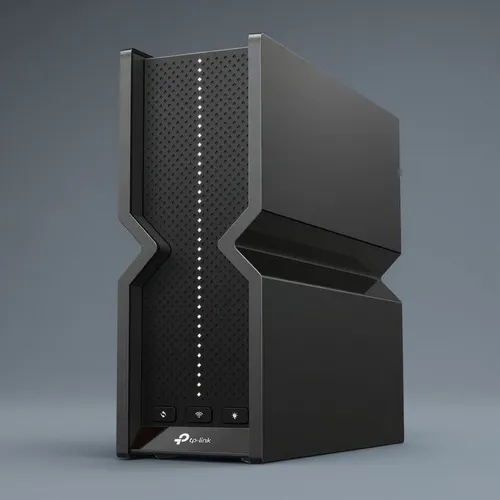
TP-Link Archer BE700 Pro Wi-Fi 7 router at $160.99 at Best Buy (was $399.99): 60% off
- Deals
- Rocks on Galaxy
- Tech
- 19 Oct, 2026
- 0
Best Buy is selling the TP-Link Archer BE700 Pro, a tri-band BE15000 Wi-Fi 7 router, for $160.99 instead of its $399.99 regular price: $239 off, or 60%. We checked the listing on Monday, October 19, 2026 (morning, CT): the unit is new (not open-box), sold and shipped by Best Buy itself rather than a marketplace seller, and available to add to cart.
Quick verdict: at this price, the BE700 Pro costs less than the dual-band Wi-Fi 7 routers on the same shelf, yet brings a 6 GHz band, a 10 Gbps WAN and four 2.5 Gbps LAN ports. For a connected home built around a Home Assistant box or a NAS, it is the most hardware per dollar we found this week.
Why $160.99 is a real deal
A big percentage alone means little, so we compared against what Best Buy charges today for routers sitting right next to it. TP-Link's own Archer BE9700 is $229.99, and ASUS's dual-band RT-BE86U is $239.99. The BE700 Pro undercuts both while sitting higher in the BE class (BE15000 vs. BE9700 and BE6800).
On price history, we stay honest: we do not have a complete price log for this model. What we can verify is that this same $160.99 price at Best Buy was already reported on October 5, 2026, so it is not a two-hour flash sale. It is also not a record we can certify. Our read: Best Buy is clearing stock of this SKU, and this kind of clearance price rarely lasts once inventory runs out.
What you get for $160.99
| Spec | Archer BE700 Pro |
|---|---|
| Wi-Fi standard | Wi-Fi 7 (802.11be), tri-band, BE15000 class |
| Max PHY rates | 6 GHz: 11,528 Mbps · 5 GHz: 2,882 Mbps · 2.4 GHz: 688 Mbps |
| Wi-Fi 7 features | Multi-Link Operation (MLO), 320 MHz channels, 4K-QAM |
| Streams / antennas | 8 streams, 6 internal antennas |
| WAN | 1× 10 Gbps combo port (SFP+ or RJ45) |
| LAN | 4× 2.5 Gbps |
| USB | 1× USB 3.0 |
| Smart-home features | Private IoT network (dedicated SSID, WPA3), EasyMesh |
| Security / remote access | HomeShield, VPN client and server (including WireGuard) |
| Modes | Router, access point |
| Size / power | 76 × 231.7 × 203 mm, 12 V / 3.3 A adapter |
Price check: the alternatives at Best Buy today
| Model | Type | Price (Oct 19) | Our take |
|---|---|---|---|
| TP-Link Archer BE700 Pro | Tri-band BE15000 router | $160.99 (reg. $399.99) | Best value of the lot right now |
| TP-Link Archer BE9700 | Tri-band BE9700 router | $229.99 (reg. $279.99) | Lower BE class, $69 more |
| ASUS RT-BE86U | Dual-band BE6800 router | $239.99 | Great ASUS firmware, but no 6 GHz band |
| TP-Link Deco BE65 Pro (3-pack) | Tri-band BE11000 mesh | $459.99 (reg. $659.99) | Pick this for large or multi-floor homes |
Why it matters in a connected home
A smart home is mostly a crowd of small 2.4 GHz clients: ESP32 sensors, Tuya and Shelly modules, cameras, speakers. The router is the piece that decides whether they stay online. Three features of the BE700 Pro help here:
- A separate IoT network. Put your plugs, bulbs and cameras on their own SSID, isolated from your laptops and phones. If your Home Assistant server sits on the main network, check that it can still reach those devices before you move everything over.
- 2.5 Gbps ports for the brain of the house. A NAS, a mini PC running Home Assistant or a Raspberry Pi 5 setup like the one we tested can be wired directly, along with a mesh satellite or a fast PC.
- WireGuard VPN server. Reach your dashboards from outside without opening ports or depending on a cloud relay.
One practical tip: if you also run Zigbee, keep the router's 2.4 GHz channel fixed rather than on "auto," and choose a Zigbee channel that stays clear of it. Our Zigbee vs. Matter over Thread study explains why radio coexistence matters more than raw speed.
Home Assistant compatibility, honestly
TP-Link Archer routers have no official Home Assistant integration. The community TP-Link Router integration on HACS covers several Wi-Fi 7 Archers (BE550, BE800, BE805, among others), but the BE700 Pro is not on its list as of today. Consider router-level entities (connected clients, reboot, guest Wi-Fi toggles) unconfirmed. The good news is that Home Assistant doesn't need them. What really matters is stable coverage and DHCP reservations for your devices, and the router handles both. For the rest of the HA ecosystem, see our Home Assistant 2026 guide.
Who it's for, and who should skip it
Buy it if: you have fiber or cable faster than 1 Gbps, a Wi-Fi 6E or Wi-Fi 7 phone or laptop, a home server to wire over 2.5 GbE, or a few dozen IoT devices to isolate.
Skip it if: your home is large or spread over several floors (a single router won't cover everything; look at a mesh like the Deco BE65 Pro above, or our earlier Deco BE3600 deal), your plan is 300 Mbps and your devices are all Wi-Fi 5, or you need router entities in Home Assistant today.
Pros and cons
| Pros | Cons |
|---|---|
| Tri-band Wi-Fi 7 with a 6 GHz band, for less than dual-band rivals | BE700 Pro not listed by the HACS TP-Link Router integration |
| 10 Gbps WAN (SFP+/RJ45) plus four 2.5 Gbps LAN ports | Bulky vertical tower design |
| Dedicated IoT network and WireGuard VPN server | Some advanced HomeShield features need a subscription |
| Sold and shipped by Best Buy, new, not a marketplace offer | Clearance pricing: no guarantee it lasts |
Bottom line
At $160.99, the Archer BE700 Pro is the router we would buy to anchor a wired-plus-wireless smart home in an apartment or a single-floor house. Check TP-Link's specs on the official BE700 Pro page, then grab it at Best Buy for $160.99 while stock lasts.